Memorial Card Wording: Simple Examples and a Review Checklist
Find simple memorial-card wording, choose the information you need, and check names and dates before printing.
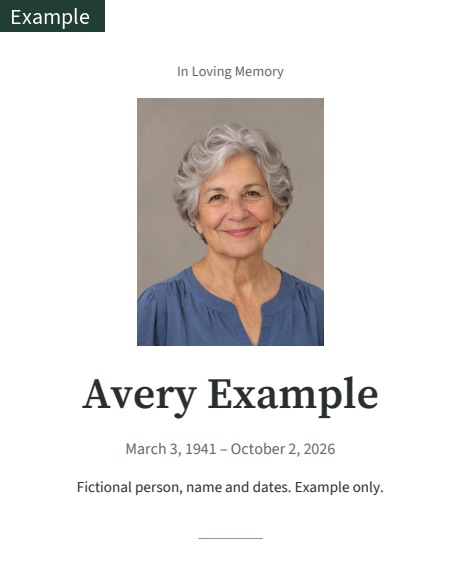
Choose a tone before writing
A memorial card does not need to tell an entire life story. It can be a small reminder of someone people already know and love. Decide whether the wording should feel formal, warm, religious or simply factual. Ask the closest family members what feels appropriate rather than filling every available line. Short, direct wording is often easier to read on a small card. A quiet design with fewer words can leave the photograph and name room to be seen.
Begin with a heading and a name
Possible headings include In Loving Memory, Remembering, Celebrating the Life of, or Forever in Our Hearts. These are examples of tone, not a required formula. Use the name people will recognize and check preferred spelling, accents and the order of family names. A nickname can be meaningful if the family wants it included. Long names should be read in the actual layout so line breaks do not separate them awkwardly. Do not shorten a name only to make a preview look tidy without asking the people choosing it.
Decide how much date information is useful
Some cards show full birth and death dates, while others use years only. Choose the level of detail that is known and wanted. Never invent a missing day or month to make the formatting consistent. Keep the same date style across the card and any entrance display, and ask someone else to compare it with a trusted family record. An event date belongs to the ceremony or notice, so distinguish it clearly from the person’s life dates. Check that the service location and time are correct as well.
Use a short personal line
You might write Loved and remembered, Thank you for the memories, Always part of our family, or Your kindness stays with us. These simple examples are offered as starting points; adapt them to what is true for your family. A specific memory can be more personal than a grand statement, but it may need a separate note if it makes the card too crowded. Read the sentence aloud. If it does not sound like something you would say, choose a simpler version rather than keeping it for the sake of formality.
Respect quotations and religious choices
If you want a poem, song lyric, prayer or published quotation, confirm that you have the right to reproduce the wording. Text found online is not automatically free to print. Check the exact wording and attribution with a reliable source rather than relying on an unattributed image. Do not add a religious phrase just because a template has space for one. A secular line, a family-written sentence or no quotation at all can be appropriate. The layout should support your choice, not determine it.
Keep ceremony details separate and readable
An entrance display or service notice may need a date, start time, venue and address that a keepsake card does not need. Write those details in a consistent order. Include enough location information for someone arriving without local knowledge, and check any room or building name. If details may change, avoid printing a large batch too early. A screen tribute may be viewed from farther away, so long paragraphs that work on paper can be difficult there. Inspect each format rather than assuming the same text works equally well everywhere.
Use a two-person proofread
One person should read the text without concentrating on the photograph, while another checks the image and overall arrangement. Review the name character by character, then the dates, optional quote and service information. Check line breaks, punctuation and whether any text has disappeared at a page edge. Read the final downloaded file, not only the editable form. If you replace a photo or change a name after a first review, repeat the check. A saved correction can change the balance of several layouts in the kit.
Print a sample and keep the final copy
Before ordering multiple cards, make one sample at the intended size. Hold it at a normal reading distance and check whether the smallest text is comfortable to read. Confirm the paper size and whether the printer will preserve margins instead of cropping. Download the files you want to keep before the online access period ends. The digital memorial kit lets you preview wording and make corrections during its access period; it is still worth having a family member approve the final words before you send them to a print shop.